Digital Album Studio › All in one app

All in one app

Album design, client proofing and galleries, in one app

Your client picks their favourites in the gallery, you turn them into an album in one click, they page through it and approve it on their phone, and you get the files for your lab. All in Digital Album Studio.
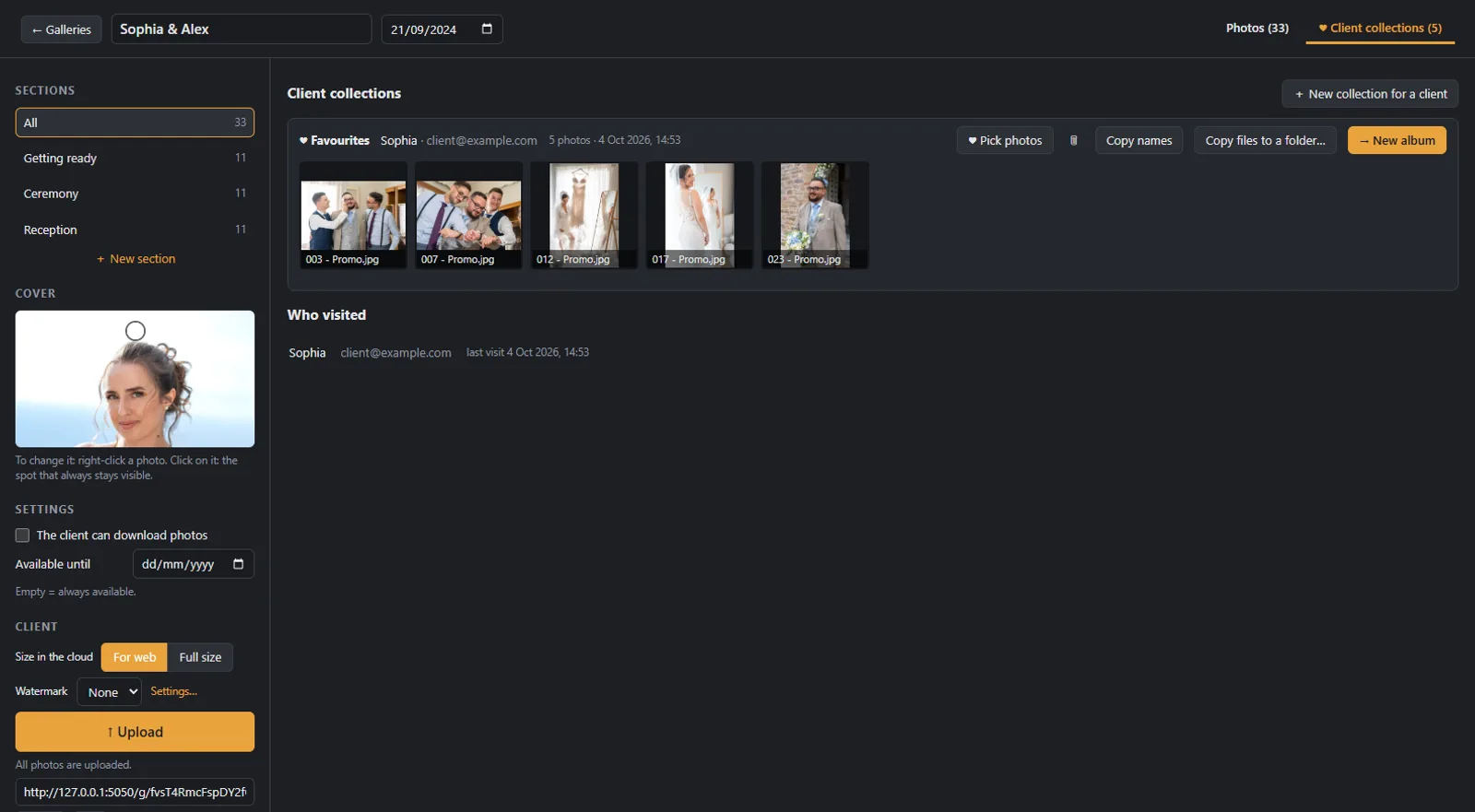
Client favourites in collections, ready to become an album in Digital Album Studio

In short

Digital Album Studio is software for Windows that brings together four jobs of a photographer: an online client gallery, album design from the client’s favourites, online album approval on any phone, tablet or computer, and print files for any lab. Plus costs €29 a month with 30 GB, on servers in the European Union.

The work in two programs

Most photographers work today with two tools: a gallery service and an album design program. Between them sits a step done by hand. The client sends their list, you find the photos one by one on your computer, you bring them into the design program, and the approval happens with PDFs, images or messages. That is where mistakes happen: a missing photo, a comment on the wrong spread.

One workflow

The same work in one app

  1. 1

    Gallery

    You upload the photos and send one link. Your client chooses with hearts and notes, and every person (the couple, the parents) can make their own list.

  2. 2

    Album

    A client list becomes an album in one click. The full-resolution photos go to the album folder and a new album opens, ready to design.

  3. 3

    Design

    Automatic spreads or free design, covers and lab templates (PSD), text and backgrounds.

  4. 4

    Approval

    Your client pages through the album like a book on their phone, writes comments on the spread and presses “Request changes” or “Approve for print”.

  5. 5

    Print

    After approval you export the files for the lab you already work with.

Before you choose

What to compare before you choose

Seven questions worth asking about any program or combination of programs.

CriterionWhat to checkWith two separate tools, usuallyIn Digital Album Studio
1. From favourites to albumHow many steps it takes for the client’s choice to reach the designA list of file names, and finding the photos by handOne click, with the files in full resolution
2. Choices from several peopleWhether the couple and the parents can choose separatelyDepends on the gallery serviceA list for every person, with hearts and notes
3. Approval on the phoneWhether the client sees the album itself, comments on the spread and approves with one buttonPDFs or images, and comments by email or messageA book they page through, comments per spread, “Request changes” and “Approve for print”
4. LabWhether the files come out for any lab you likeUsually yes, from the design programLab templates (PSD) and files for any lab
5. Your nameWhat the client sees: your studio or the name of the appVaries with each toolYour studio’s name and logo, in the client’s language (6 languages)
6. CostHow many subscriptions, and whether there is a fee per albumTwo subscriptions, about $52 a month togetherOne subscription, Plus €29 a month, no fee per album
7. Where the photos liveIn which country the servers are, and what happens when you stopVariesServers in the European Union, 30 GB on Plus, clear rules in the terms

When something smaller is enough

Good to know first

The app runs on Windows; a Mac version is planned. The public launch is in January 2027; until then founding members (20 spots) have all of Plus free.

Questions

Frequently asked questions

Is there an app that designs wedding albums and also does galleries?

Yes. In Digital Album Studio your client chooses in the gallery, their choice becomes an album in one click, and they approve the same album online on their phone. You need no second program and no file transfers.

What software do photographers use for albums?

Most use an album design program and, separately, a gallery service. Some design in general layout programs. It is worth checking how much time the transfer between them costs you (criterion 1 of the table).

How do photographers give clients their photos?

Usually with an online gallery: one link, with a PIN if you want, where the client views, chooses and downloads. See the guide how to send photos to clients without losing quality.

Can the client approve the album on their phone?

Yes. They open a link, page through the album, write comments on the spreads and press “Approve for print”. They need no account and no app. More on the page online album proofing.

Does it work with my lab?

Yes. The print files come out for any lab, and you can load your lab’s templates (PSD) for covers and spine.

How much does it cost?

Plus, with design, approval, galleries and 30 GB, costs €29 a month or €280 a year, from January 2027. Founding members have it free until then. All prices on the pricing page.

Does it work on a Mac?

Not yet. The app runs on Windows and a Mac version is planned. The client pages (gallery and approval) open on any device.

Try the whole workflow on your next album.

Founding members have Plus free until January 2027, then 40% off the first year.