The couple gets a download link, opens it on their phone, sees a zip file and leaves it for the weekend. A month later the bride’s mother writes to you: “The link doesn’t open. Could you send them again?”
Photos lose quality mostly when they are sent through Viber, WhatsApp or Messenger, which compress them. WeTransfer and Google Drive keep the files as they are, but your client can’t easily see them in order and choose. An online gallery gives you both: viewing on the phone and downloads in full resolution, whenever you want.
At a glance
- Quality is lost in messaging apps; WeTransfer and Google Drive send the files as they are.
- For screens, 1920 pixels on the long side is enough; the album and prints need full resolution.
- A PIN, an expiry date and downloads on or off are the photographer’s choice.
- A gallery is for your client to see and choose; keeping the photos for years needs a copy of their own.
The three ways: file transfer, cloud or gallery
Most photographers send photos in one of three ways. The big difference between them is what your client sees and how long the link lasts.
| WeTransfer (file transfer) | Google Drive (cloud) | Online client gallery | |
|---|---|---|---|
| Quality | Files as they are | Files as they are | Screen size or full resolution, as you choose |
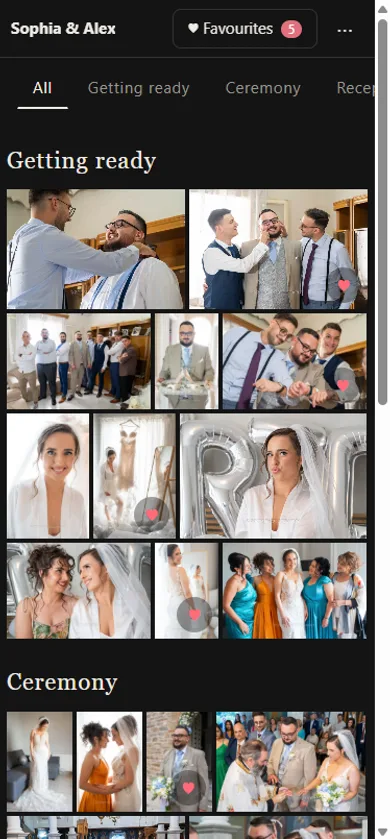
| What your client sees | A zip to download | A folder of file names | The photos in the order of the day, with your logo |
| How long it lasts | The free link expires in a few days | Until you delete the folder | As long as you want, with or without an expiry date |
| Privacy | Anyone with the link | Link or access by email | Link, PIN, and who visited |
| Choosing for the album | By messages and file names | By messages and file names | Lists with hearts and notes, for each person |
WeTransfer suits you when you simply want the files to go out fast, for example to a colleague. Google Drive suits anyone who already uses it, within its free space (15 GB, shared with Gmail). A gallery suits you when your client needs to see the photos, show them to family and choose for the album.
Where quality is lost, and where it isn’t
Quality is lost when photos are sent as photos on Viber, WhatsApp or Messenger. These apps shrink and compress each image so it goes out fast, and your client keeps a copy on the phone that doesn’t print well.
WeTransfer and Google Drive send the files as they are. So does a gallery, when the files are uploaded in full resolution. If your client talks to you on WhatsApp, one way that works well is to send only the link to the gallery or the download from there.
What size is enough: screen, social, print
For your client to see the photos on a phone or a computer, a web copy is enough. The album and large prints need the file in full resolution.
| Use | Size that is enough |
|---|---|
| Phone and computer | 1920 pixels on the long side |
| Instagram and Facebook | 1080 to 2048 pixels |
| 4 × 6 in (10 × 15 cm) print | about 1800 × 1200 pixels |
| Album, frame, large print | full resolution |
A web copy opens fast, uploads much faster and takes little space. Many photographers upload screen-size copies to the gallery and hand over the full-resolution files separately. If the copies keep the same numbers as the originals, when your client picks “0245”, you know at once which file they want for the album.
Who sees the photos: PIN and new link
A link without a code opens for anyone who gets it, and links travel: from the couple to the parents, from the parents to a family group. A PIN keeps the gallery for the people it is meant for, and for your client it is a step of a few seconds.
If a link goes somewhere it shouldn’t, a new link stops the old one at once. It also helps to see who visited, with name and email, so you know whether your client ever opened the gallery.
A list for each person
At a wedding it isn’t only the couple who choose. The parents want their own photos for frames, the maid of honour wants hers, and their choices often get mixed up in one shared message.
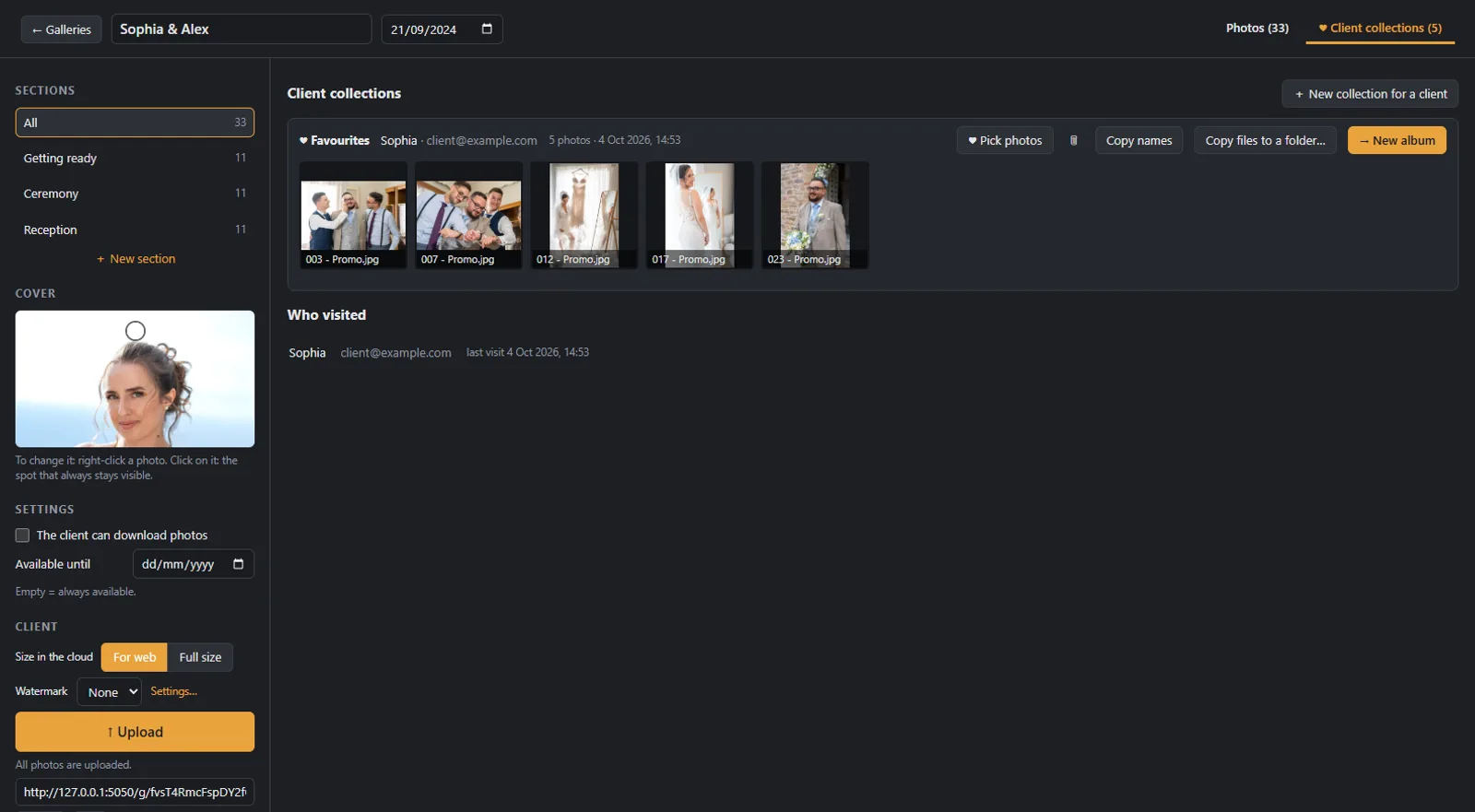
In a gallery where each person signs in with their own name and email, everyone makes their own lists and sees only those. The couple can have one list called “Album” and one “For grandma”, and the parents one of their own for the parents’ album. You see them all, with each person’s name, their notes and when they changed.
How long the gallery stays open
There is no right length. Many photographers leave the gallery open until the client has chosen; others set an expiry date, so the choice doesn’t wait for months.
If you want to nudge the choice a little, an expiry date with a reminder a few days before helps. Whatever you choose, it is good to have it in the contract too, so your client knows from the start how long the photos will be available.
Downloads from day one or after the choice?
Here photographers disagree, and both ways make sense.
- Downloads from day one: your client keeps the photos straight away and shares them with family. It suits you when the package includes all the files and the choice for the album happens alongside.
- Downloads after the choice: your client first sees all the photos in the gallery and chooses calmly, and the files come later. It suits you when you want the gallery to stay a place for choosing.
The same goes for the watermark: some put it on every photo in the gallery, others not at all, and others only while downloads are off.
How long you keep the photos, and where your client keeps them
A gallery is for your client to see and choose. To still have their photos in ten years, they need a copy of their own.
Every photographer has their own policy. Some hand over the full-resolution files on a USB stick or as a download, and a few months after delivery they delete them from their computer or archive them on an external drive. Others keep them for years. Either way, it helps if your client hears it at delivery: that keeping the photos is now up to them, and that two copies in different places protect them if one is lost. If your client loses their photos, a new copy is possible only while the files still exist.
How fast you send the photos
Every photographer has their own pace; some send within a few days, many need weeks or months. What keeps your client calm is knowing from the start when they will have them.
One way that works well is to tell your client a little more time than you usually need. That way the photos arrive earlier than they expect.
How Digital Album Studio does it
In Digital Album Studio the gallery is made from the wedding folder, and each subfolder becomes a section in the order of the day.
- Size: “For web” (1920 pixels, up to 250 KB, like a web export) or full size, for each gallery. The web copies keep the names of the originals, and the app finds the full-resolution files for the album by itself.
- A PIN of 4 to 8 characters and a new link that stops the old one at once. You see who visited, with name and email.
- Lists for each person (called collections in the app): each client signs in with their name and email, without an account, and makes as many lists as they like, with hearts and notes on the photo. When a list changes, you get an email. You can also make a list for your client yourself, for example when you choose together in your office.
- Available until, if you want it, with a reminder email to your client 3, 7, 14 or 30 days before. After that date the gallery closes for your client and opens again with a new date; 30 days later it is deleted from the cloud, with an email to you at least a week before.
- Downloads on or off (off by default), changing at once, even in a gallery you have already sent.
- A watermark with text or your logo.
- From a list of favourites, a new album in one click. The guide How to deliver wedding photos with an online gallery shows the whole way.
If you only want galleries, without a program on your computer, there is “Galleries only”, in your browser, for €9 a month. Step by step: how to set up your first gallery.
Next step: once your client has chosen, how many photos fit in a wedding album.
Would you like the next guides in your inbox?
New guides for photographers and news from Digital Album Studio, by email.