The couple chose their favourites from the gallery and the album is designed. The most delicate part is left: they look through it, ask for whatever they want changed and approve it for print, without endless messages.
Approval goes quickly when your client has a link that opens on the phone, a short message that tells them what to do, and a clear way to say “I want changes” or “approved”. When they chose the photos themselves, changes are usually few. Here are ideas from everyday practice.
At a glance
- The album can go out for review as soon as it is ready; the closer to the wedding, the more eager the couple.
- A ready message that you copy each time saves most of the questions.
- When the couple chooses the photos, more than 2 to 3 rounds of changes are rarely needed.
- Anyone the couple wants can see the album; the couple gives the final approval.
- Many clients forget the approval button; a confirmation by message or phone helps.
When to send the album for approval
The order is usually the same: gallery, favourites, album, changes and approval, print. As soon as your client has chosen the photos, from the gallery or another way, and the album is designed, it can go out for review straight away.

There is no set number of days or weeks after the wedding; every photographer has their own timing. It helps to do it as soon as you can, though: the couple is still excited about the day and sits down to look at it quickly.
The message that goes with the link
Many photographers keep a ready message and send it with the link, on WhatsApp, Messenger or by email, wherever they talk with the client. It explains beforehand how the album opens, how to leave comments and how to finish, so the client doesn’t need to ask. A template, written for an album in Digital Album Studio, that you can adapt:
How to review your album
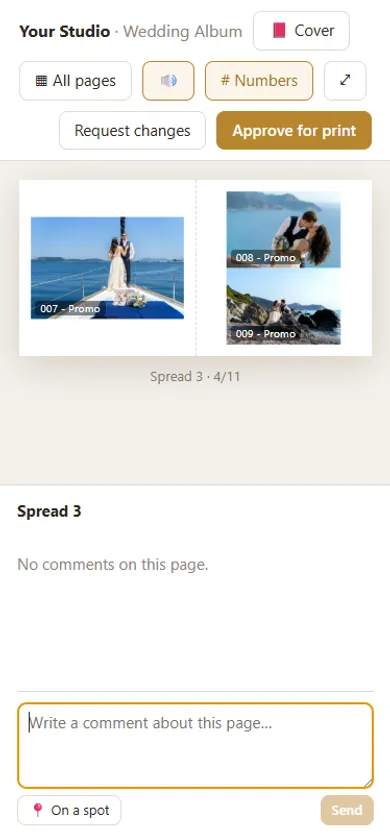
Open the link at the end and type your name and the code (the same as for your photos).
The first page shows the closed album: tap it to open it, or drag it to see the back.
With the arrows, the ← → keys or by swiping on your phone, you move to the next or previous page. You see each spread open, as it will be printed.
“All pages” at the top shows the whole album at a glance.
On the right (below on a phone) you write any comment about the spread and press “Send”. I see it straight away.
“Numbers” (#) at the top shows the number of each photo, for changes like “swap 0005 with 0009”. If you tap a photo, the comment goes to that photo only.
When you are done, press “Request changes” (the new version comes to the same link) or, when everything is ready, “Approve for print”. I will call you to confirm before it goes to print.
It opens on a phone, tablet or computer. The “?” at the top shows the quick guide again.
[album link]
If you have a page with detailed instructions and pictures on your own website, a link at the end of the message helps those who want more. Otherwise the message on its own is usually enough.
How many rounds of changes
Many photographers set a number of rounds from the start, to avoid delays and extra work. Others set no limit and do as many rounds as needed.
When the couple chose the album photos themselves, more than 2 to 3 rounds are rarely needed, and they usually concern 1 to 3 photos. These rounds are often not charged. Whatever is charged is best set out at the start, in the agreement with the couple, for example photos beyond the number agreed.
The changes clients ask for most
The most common is the order of the photos within a spread. Less often, the couple asks to take a photo out or put another in. With the photo numbers and comments on the photo, such changes take one line.
When clients ask for big changes
If the couple wants to add photos and extra spreads are needed, they usually pay for those spreads already, so the design change doesn’t need a separate charge. If they ask for a large part of the album to be redone, many photographers judge case by case: sometimes free, sometimes charged. When the photos are the couple’s choice, such changes are rare.
Who sees the album and who approves it
The couple gets the link and the code, or the parents for a baptism. They can share them with anyone they want to see it: parents, siblings, best man or maid of honour. From then on, how they talk it over is their decision.
One simple rule settles conflicting opinions: only the couple gives the final approval. Whatever the couple approves goes to print.
A deadline or a reminder?
Some photographers set a date for comments. Others set no deadline and send a reminder when the client is slow, judging each delay on its own. Both work; it helps if your client knows from the start which one you follow.
The final approval and the check before the lab
The clearest is an “Approve for print” button on the album page, with a name and a time. Often, though, the client forgets to press it and sends a message or calls instead. That is why many photographers also confirm the approval by phone or message before printing.
After approval, a last check of the final files for print errors is worth it before they go to the lab. Often the lab also lets you know if it sees something wrong or something forgotten.
How Digital Album Studio helps
- With Cloud Proofing the album is uploaded from the app and your client gets a link, with a code if you want. It opens like a book on the phone, without an account and without an app.
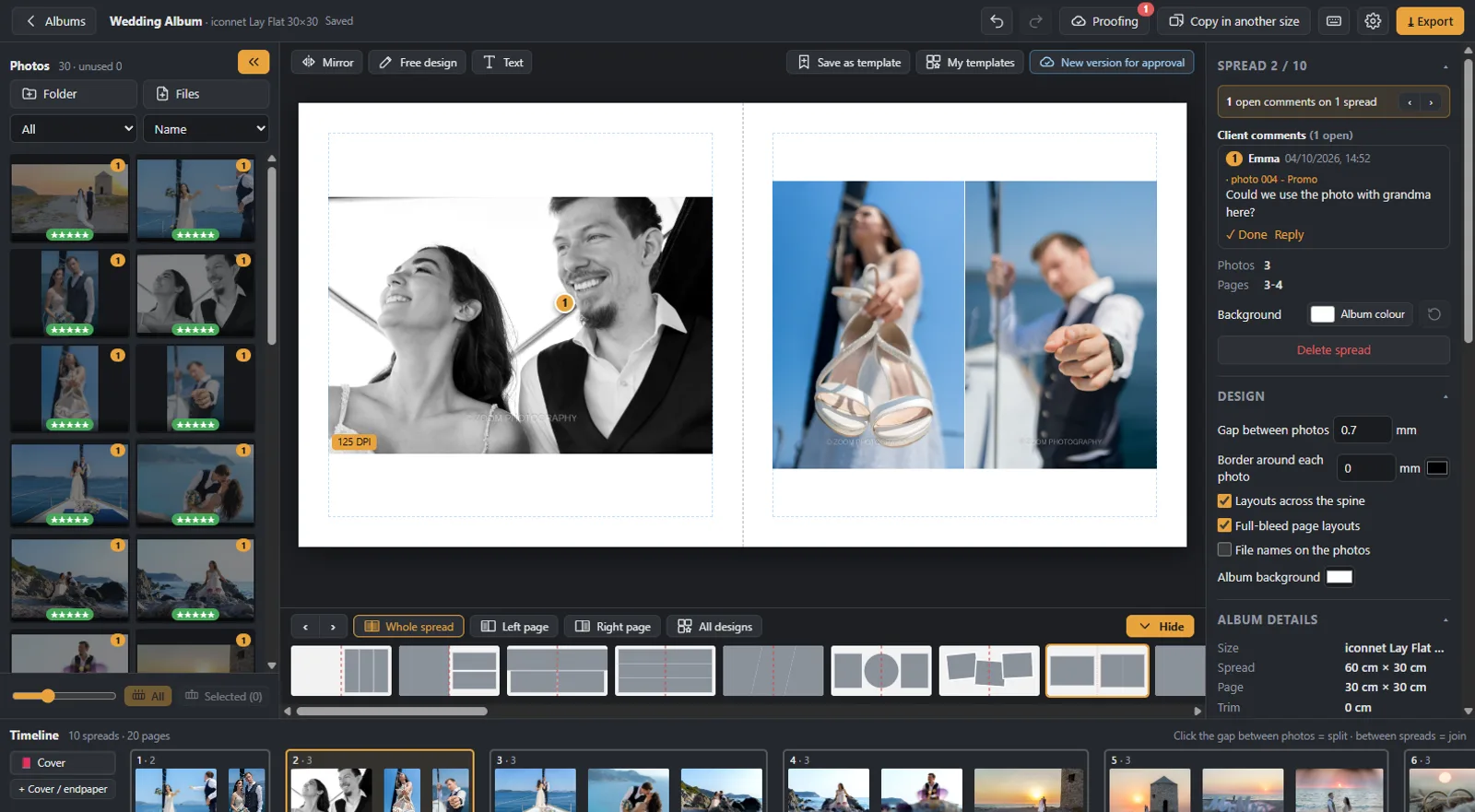
- Your client writes comments on each spread or on a photo, and sees the photo numbers with “#”. The comments appear in the app, on the spread they refer to.
- After the changes, the new version goes to the same link; your client always sees the latest.
- The “Request changes” and “Approve for print” buttons show the status of each album in the app, with a name and a time; approval warns the client if comments are still open.
- After approval, the files come out ready for the lab. More on the page Online album proofing.
Why one app for all of it: album design, proofing and galleries in one app.
Would you like us to design the album? From your client’s favourites, under your studio’s name: from €5 a spread, and your first album is half price. Album design service
Next step: before the link, how to design a wedding album.
Would you like the next guides in your inbox?
New guides for photographers and news from Digital Album Studio, by email.