You use album design software every week, for years. If it is slow, if it doesn’t take your lab’s templates or if it loses a day’s work, you pay for it on every album. A trial before you buy is worth more than any feature list.
The right software for you is the one that fits the way you already work: the lab that prints, the photos your client chooses and the speed you want. Here are the points worth checking, in one table, and a few questions for the trial.
At a glance
- Start with your lab: the software should take its sizes and templates.
- Time how quickly you get from your client’s favourites to a first album.
- See whether you can change anything by hand when the automatic suggestion isn’t enough.
- Check the print files: resolution, trim, margins, a cover with a spine.
- Ask what happens to your work if the computer shuts down or the subscription ends.
The criteria in one table
| Criterion | What to check | Why it matters |
|---|---|---|
| Lab | Whether it takes the sizes and templates (PSD) of your own lab, not only ready lists | Otherwise you set up each size by hand or change lab for the software |
| Speed | How many clicks from your client’s favourites to a first album in the order of the day | Over many albums a year, every minute multiplies |
| Layouts | How many layouts it suggests per spread, whether they fit portrait and landscape photos, and whether you keep your own templates | Software with few layouts makes every album look alike |
| Control by hand | Whether you freely change position, size, margins and text, and whether a photo opens in Photoshop and comes back | The suggestion is the start; your style is in the changes |
| Cover | Whether it builds a cover with spine and wrap on your lab’s template, with a zone for foil stamping | The cover is often where mistakes show first |
| Print files | Whether you set resolution (DPI), trim and safety margins, and whether it warns about photos printing below your lab’s DPI | A mistake here only shows when the printed album arrives |
| Another size | Whether it makes an exact copy in a smaller size for the parents’ albums | Otherwise the same spreads are built again from scratch |
| File safety | What happens if the computer shuts down while you work, and whether the software ever touches your original files | A lost day of work costs more than the subscription |
| Client approval | Whether your client sees the album online and comments on the photo, or you need a second tool | Comments in messages with spread numbers get lost easily |
| Computer | Whether it runs on the system you have (Windows or Mac) and whether it works offline | Software that doesn’t run on your computer isn’t an option |
| Price | Subscription or one-off, fees per album or commission, and what stays yours if you stop | The cheapest price at the start isn’t always the cheapest over three years |
Start with your lab
The first thing worth checking is the lab that prints your albums. Software that works only with its own size lists ties you to certain labs. Software that reads the template (PSD) your lab gives you, with the sizes, trim and spine, lets you work with any lab, and change lab without changing software.
Speed: from favourites to the first album
One idea for the trial: take a real job with a client’s favourites and time a first album. See whether the software splits the photos into spreads in the order of the day, how many layouts it suggests per spread and how easily you switch between them, ideally from the keyboard too.
Control: when the automatic suggestion isn’t enough
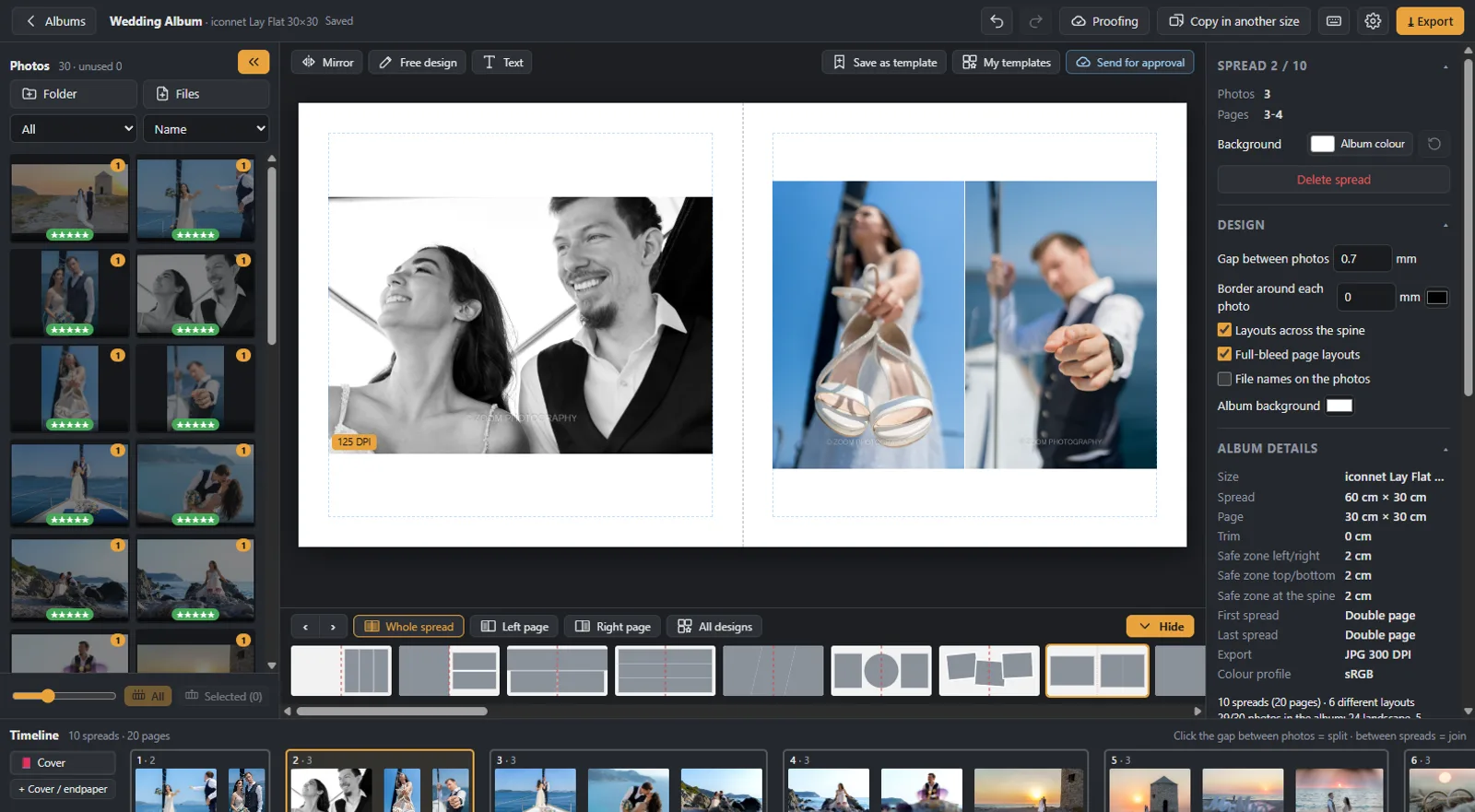
The automatic suggestion saves time, but your style shows in the changes. It is worth testing whether you freely change position, size, margins and gaps, whether you can put text on the spread, and whether a photo opens in Photoshop and comes back without losing its place. Software that locks you into its layouts will make your albums look like everyone else’s.
Covers and print files
The cover and the print files are where a mistake only shows in the printed album. Try a cover with a spine on your lab’s template, and export files for a test album. See whether you set the resolution, trim and safety margins, and whether the software warns you before export about empty spreads or photos printing below your lab’s DPI.
Your work and your files
Two questions rarely asked before buying: what happens if the computer shuts down while you design, and whether the software ever changes your original files. It is also worth knowing where your albums live, on your computer or only in the cloud, and what you keep if you stop the subscription one day.
Approval, galleries and one or two programs
Many photographers use one program for design and a second one for galleries and approval. It works, but between the two there is a step by hand: the client’s list, the photos you look for one by one, comments in messages. If that bothers you, see the comparison on the page Album design, proofing and galleries in one app and how approval works in the guide How to get clients to approve the wedding album.
Questions for the trial
- Can I load my own lab’s template?
- How long does a first album take from a real client’s favourites?
- Can I change every spread freely and keep my own templates?
- Do the test files pass my lab’s checks?
- What happens if the computer shuts down, and what do I keep if I stop?
- What does it cost in a year for the albums I make, and is there a fee per album?
How Digital Album Studio answers
- Lab: it reads your lab’s PSD for sizes and covers, and works with any lab you choose.
- Speed: your client’s favourites become an album in one click, and Auto-Build splits them in the order of the day; for each spread it suggests up to 40 layouts, with the [ and ] keys.
- Control: free design, text, backgrounds, your own templates, and Photoshop with Ctrl+E.
- Print: DPI, trim and margins per album, a warning for photos below the DPI, and Copy in another size for the parents’ albums.
- Files: albums stay on your computer, originals never change, and work isn’t lost in a power cut.
- Approval and galleries: in the same app, with no fee per album.
- Computer: Windows; a Mac version is planned.
More on the page Album design software and on pricing.
Would you like us to design the album? From your client’s favourites, under your studio’s name: from €5 a spread, and your first album is half price. Album design service
Next step: how to design a wedding album, step by step.
Would you like the next guides in your inbox?
New guides for photographers and news from Digital Album Studio, by email.